Wednesday, April 15, 2015

WINDOWS 10 TECH PREVIEW EXPERIENCE AND DEVELOPMENTS

Expanded Start menu
Since the time Windows 10 Tech Preview was released back in October 2014, there has been several versions to the newest operational system from Microsoft the is nearing its final release to customers.
The overall experience has been great, we have seen the return of the start menu with a combination of Windows 7 and 8.1 UI. We saw the birth of virtual Desktops which are still in development stage since are still buggy and laggy.  Also we've seen the addition of the search bar with the Smart voice assistant

Cortana that works like Siri or Google Now, since Windows is going to be an OS across all devices Cortana will make a great addition to the mobile market.

Search Bar and Cortana
Another nice feature is the notification panel.
Notification Panel
The latest build 10049 introduced Project Spartan. The newest addition is the Project Spartan that seems to be the replacement of Internet Explorer. The UI of Spartan is very much like the most popular browsers like Firefox, Chrome. Spartan still a work in progress since it has not reach total functionality.


Build 10056 has leaked over the net where several websites have point out some of the developments expected like a smoothest experience with virtual desktops.
Windows 10 Tech Preview can no longer be treated as a beta since it has earn a well deserved status for its stability and compatibility.
 Direct descendant of Windows 7 and Windows 8.1 with the additions needed to crossover platforms which it has been the most important goal of Microsoft ever since Windows 8 and 8.1 where it completely failed.
Virtual Desktops
Spartan


Thursday, October 2, 2014

WINDOWS 10 TECH PREVIEW IS OUT FOR DOWNLOAD NOW AND INSTALL ON VM

Windows 10 Tech Preview is out for download here. There are links for several files in English 64bit,  32bit, Portuguese(32bit, 64bit), Chinese(32bit,64bit). There are several websites talking about it so lets not repeat all that had been said. 
Since Microsoft recomends not  install it on a second PC or on a virtual machine, we opted for the second option. 
To install onVirtualBox is required to have the latest version 4.3.1.2. To setup the new virtual machine click on New, Name Windows 10 VM, windows type "Windows 8.1", ram use recommended unless there is only 4GB on host PC, if thats the case you will have go a bit lower than recommended. (This applied in our case that we install the 64bit version which requires 2GB of ram so we use a bit lower). Note if you are using the 32bit version you must use Windows 8.1 32bit type, and for the 64bit version the Windows 8.1 64bit type. After that do not change anything just follow the screens, create a virtual drive image at the size fixed. Once the virtual machine is created with the machine selected go to settings, on sytem make sure "Enable I/O APIC" is checked. Choose the kind of pointing device you have tablet, ps/2 mouse. At the processor tab make sure "Enable PAE/NX" is checked as well, also you can choose more than one core if your device permits.
 
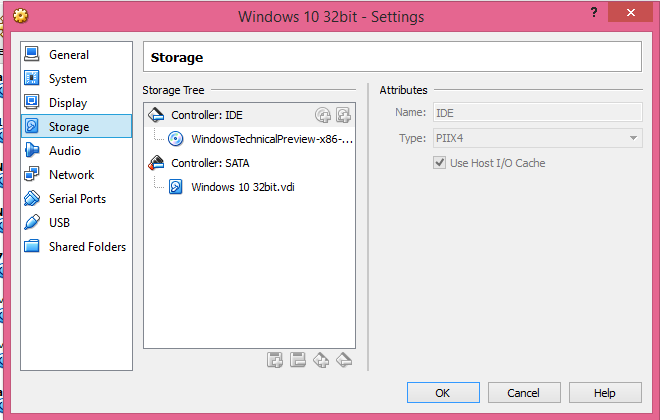
Display video memory can be adjust at your taste from 18MB to 108MB. On Storage click the empty CD then at the icon CD on the drop down menu choose virtual cd/DVD file, it will take you to a new window where you will find the location of the ISO file downloaded. Once located select and open, then you will see it loaded on the main window of VirtualBox at the Storage section. Virtual machine is ready to be booted. Hit start button on the 64bit version if you see that prompt to click on cd please do so, otherwise you will see the setup  language window, from here just follow as a regular windows install. Install as custom to use the virtual disk image at 25GB.


If VirtualBox fails to create, go into System Properties, under Performance click on settings, turn DEP for all programs and restart PC.

Tuesday, September 30, 2014

WINDOWS 9 NOT IT WILL BE WINDOWS 10

Now it has been confirmed by Microsoft to the press that the new official name to the next version of the its operating system will be WINDOWS 10. It will have the features that already had been leaked like the new combined  Start Up Menu.


More importantly it has been confirmed that its going to be one platform across all its devices: Xbox, Desktop PC , laptops, tablets, smartphones.


Microsoft has introduced the product and will released a preview by tomorrow.


As we talked before Windows will have multiple virtual desktops and Cortana the virtual asistant, which is a voice activated search interaction similar to Siri and Google Now.
Windows 10 should be releasing next year for now MICROSOFT will released a technical preview which is only recommend to be for second PC or as a test OS not as the main OS.


Wednesday, September 17, 2014

WINDOWS 9 FINALLY LEAKED WITH GOOD NEWS

Microsoft is about to unveiled Windows 9, there are rumors the name maybe just Windows. The start menu is back like most people like it. It would be a mixture of the classic menu and the metro interface. The video preview of the classic menu seems pretty nice and efficient.


Another promising feature that the leak functioning refers its virtual desktops. This may provides more than one desktop which would be amazing and totally revolutionary. Lets hope it works the way it promise to be and not a lackluster feature. As we already know this is the way Microsoft has always released its products this maybe a success. On September 30 would be unveiled and its set to go public in January 2015. 


The notification center is another place that is been expanded for better utilization as its point out in the German Blog that leaked most of the information.


Another addition the blog mentions is the incorporation of the mobile base CORTANA which is like SIRI of Apple and Google NOW of Google. Windows tried this already with Windows Vista having a desktop assistant  we hope it works this time around.


Thursday, April 24, 2014

WINDOWS 8.1 UPDATE "NEWS"

Microsoft keeps trying to correct its failure with Windows 8. The company released Windows 8.1 and we did not see much of improvement to please its Windows 7 user that still refused to throw themselves to the new OS, myself included. As I commented in previous posts, users were begging for the return of the classic Start Menu. Just recently Microsoft released a major update to Windows 8.1. They do offer faster searches, but our hoped Classic Start Menu did not come back as we expected. What we got in exchange was an alternate menu. The links to the programs are not organized as they were in the Classic menu, but they gives the home work that we can organize them our selves very thoughtful of them right. From my part since I am so use to the Classic Menu I use a third party application Classic Shell that organized all my applications in the Windows 7 style.   Well not everything is bad news, a power button was added to the tile screen, because in the first releases to shutdown the system was a real hustle to look for the button, also the desktop has a shutdown option on the Start button. The other benefit we got is that for those lovers of the desktop environment, we get the option to make the desktop as the default start.
There is still a long way to go to match the success of Windows 7 and manufacturers are pushing Microsoft to lower prices since they are losing money with the new OS. There are already rumors of Windows 9 to try to match Steve Jobs legacy of having A single OS for several devices.
Lets wait and for now all we can do is make suggestions to see if the gurus at Microsoft finally listen, because in the past they always act at their will, but they were lucky to get fine products like Windows XP and Windows 7.

Tuesday, August 20, 2013

WINDOWS 8.1 IS SET TO GO PUBLIC IN OCTOBER

The latest update to Windows 8 is set to go public this October. Are we getting any surprises from Microsoft or they will give us the tiny changes that don't make any sense. We hear that project Mozilla might giving a push to this metro environment by introducing Firefox app. Microsoft has to offer a better product to back the tablet industry otherwise will be eaten alive  by iPad. Microsoft really has to define its market. They are trying to invade Apple's market and leaving their own. In an era of mobile predominance all major participants are trying to grab the biggest piece of the pie.
We hope .Microsoft takes the needed turn in the right in direction to avoid its decadency.
If Microsoft continues its pattern the OS that follows Windows 8 should be the winner. Like in the past.:
Windows 3.0 failure.
Windows 3.5 hit.
Windows 95 better known blue screen of death.
Windows XP  most stable until then.
Windows Millennium failure.
Windows 2000 stable.
Windows Vista nice but heavy on graphics.
Windows 7  most stable ever.
And finally Windows 8 metro interface still waiting to see the real progress.

Sunday, July 28, 2013

LAPTOPS WINDOWS 7 AND WINDOWS 8: THE SO CALLED WINDOWS 8.1 PREVIEW HAS ARRIVED

LAPTOPS WINDOWS 7 AND WINDOWS 8: THE SO CALLED WINDOWS 8.1 PREVIEW HAS ARRIVED: On June 26 we got Windows 8.1  and the news were  not very amusing the promised changes are not there. This is not a major update as we were...

THE SO CALLED WINDOWS 8.1 PREVIEW HAS ARRIVED

On June 26 we got Windows 8.1  and the news were  not very amusing the promised changes are not there. This is not a major update as we were expecting. The start button only takes us to the metro tiles and not the classic menu as we all wanted. We do have to recognized there has been improvement in browsing secured sites and flash compatibility is better. Tablets are still reporting problems with compatibility and browsing. We still need the help of third party applications to make the interface quicker or at least all our navigation through the apps much more healthier. Classic Shell does a great job to make it speedy. We hope microsoft does listen to the public and not just act like a dictator to force us to take whatever they think is right. The desktop does not seem to go away if there are not real improvement on whatever upgrades they decide to promote. There are improvement in resources to use new technologies but as always any average consumer its interested in speed and simplicity. Microsoft in its interest to unify mobile, desktop and tablet interfaces as Mac, what is doing is complicating things. When the desktop interface had reach a great point of performance they decided to come up with something different. Its the never ending story with Microsoft.

Tuesday, June 18, 2013

WINDOWS 8.1 TO COME JUNE 26

We have seen the preview of windows 8.1 and it looks nothing like promised before. We are never sure what Microsoft final product is, because there are changes everyday. They are announcing now a faster tile interface, perhaps they had promise make the desktop interface the default. They also promised an option to the classic start menu and it does not seem it will happen for now. Microsoft does not understand what customers like and they are forcing the tile interface discussing to have faster access to all apps. Hope its not another mistake of Microsoft that may force them to a major update.
After 8 months of the operating system of being release we are still seeing problems of incompatibility with a lot software. Its taking to long to all developers to support windows 8, is this also Microsoft's fault for not releasing API to developers ahead of time.
Lets see what MICROSOFT has to show in about a week that is the period to release windows 8.1. Let's hope we see what we seen on the preview and see if we can make the most of it. Not everything it is bad in whats coming it should be an smoother experience. Let's hope it gets a better acceptance from the public. See you in a week and we will tell you our experience.   

Tuesday, April 23, 2013

WINDOWS 8.1 GOING BACK TO DESKTOP MODE.

Microsoft changes its mind brings back the start menu after it was removed. 1.5 millions download of Pokki a start menu replacement help in making them aware the direction the user want. They claim they have make studies to removed but the results don't show been reality.
Another important change Windows 8.1 is bringing is give the option to users to bypass the tile start to desktop direct boot. This option will give the tile haters to go back to the Windows 7 environment that many refuse to leave.
Like many other Microsoft releases this is still in slow process development, which means we can expect many revisions and service packs. If Microsoft doesn't achieve to get its operating system across users, they will have to go to work into a whole different design more appealing to users.

Friday, April 19, 2013

WINDOWS 8.1 COMING SOON.

Looks like Microsoft its starting to listen to its customers. We all missed the old start menu where we could find all programs easily without changing UI find them. A few websites and forums already are giving advances of the beta and the changes. The OS will be smoother  for navigation but in essence most of the OS does not change much. There were already third party software trying to recover the old start menu like Vstart. Windows 8.1 code named Windows Blue may be release as soon as June this year. If Microsoft does not act quick it will be losing a lot of its customers to the competition that its obviously waiting to get a piece of the share in the OS market. Google, Mozilla, Apple, Linux are all right on the head of Microsoft to still its monopoly that had been absorbed the market for decades. Let's see what Microsoft has in mind to recover from this major setback.
Right from the release Windows 8 was never well received for the limitations due the lack of support from major software designers/ producers. The process to support and expand has been very slow.
In the past when a major OS was release by the time to go public it was already supported by most software providers.

Tuesday, April 16, 2013

THE FUTURE OF WINDOWS 8

The release of the newest Microsoft product Windows 8 with its metro tiles design was supposed to revolutionize the industry of computer and mobile world since the purposed was to address the touch  environment, Microsoft in its effort to get ahead of its competitors release its metro UI environment without setting a wide range of applications as in its previous products, or as its offered by competitors Google with its android/chrome OS(with millions of apps) or apple or even Ubuntu which is the strongest Linux distribution in the market. 
Microsoft windows 8 was trying to sync with its windows phone environment, but the limited range of apps really disappointed most user driving them elsewhere. 
Even the less knowledgeable user of the internet would have trouble navigating the net since most websites would not work on the internet explorer app. Who would have tell us there were two different internet explorers the app version and the desktop version. Events like this causes confusion as windows ever does then they have to update an revise almost on the daily bases. Most people is going back or staying on windows 7 which as windows XP has been the best and more stable products of Microsoft. Looks like Windows 8 will have a short life until Microsoft finds an alternative to this mess. Windows 8 its hitting a dead end soon since the /OS is not powerful for the business world. 

Wednesday, April 3, 2013

Dell inspiron 15R

Someone I know was wondering if Dell was still selling laptops with Windows 7 on it. The reason nobody is seems to like Windows 8 for some limitations. Windows 8 still has some road to run, there are not enough apps as applications functional in windows 7. Since there is a transition to the new HTML5 some websites are not compatible or functional. Windows 8 with its tiles and promise to dominate the touch environment it came short.
So I found a machine from dell which carries windows 7 with the posibility of touch environment isn't great or what and for a fairly good price.